
Exstrom Laboratories
Copyright 2005-2025
Exstrom Laboratories LLC
Detecting Ultrasound with a Raspberry Pi Pico
Even though they're not specified for it, a lot of microphones can detect frequencies above 20 kHz. Some MEMS microphones, electret microphones, and piezo crystals can be used to detect ultrasound. One MEMS microphone that can detect ultrasound is the SPH8878LR5H. It has a frequency response that peaks at around 40 kHz and still has good sensitivity at 100 kHz. The fact that the response is not flat at ultrasonic frequencies is not an issue if all you want to do is detect if something is emitting ultrasound and aren't concerned with the spectrum. Most microphones have a flat frequency response in the audio range of 20 Hz to 20 kHz because the intent is to reproduce the detected sound for human ears and a non flat response would distort the sound. Reproducing the original sound is not our intent here.
Sparkfun makes a convenient breakout board for this microphone that can be used with a slight modification. The board is configured to have a band pass frequency response that ranges from 7.4 Hz to 19 kHz. You can extend the upper limit by removing a 27 pF capacitor in the feedback loop of the opamp. With that slight modification you can detect ultrasound frequencies up to around 100 kHz.
There are other limitations such as the bandwidth of the opamp used on the board (OPA344) that prevent going to much higher frequencies. The board with the modification does not have a flat frequency response so you can't use it to measure the spectrum of an ultrasound source, but you can use it to detect the presence of ultrasound, and measure the relative strength of two ultrasound sources at the same frequency.
The output of the microphone board is directly digitized by ADC channel 1 of the Pico at a rate of 200 ksps (kilo samples per second). This means that only ultrasound frequencies below 100 kHz can be reliably captured. If higher frequencies are present they will appear (be aliased) as frequencies below 100 kHz. If this is a problem a low pass filter can be put between the microphone and the Pico or a higher sampling rate can be used. The code running on the Pico is written in C and is shown below.
The Pico is controlled by software running on a Linux computer connected via USB. The Pico waits until it recieves the character 'a' from the computer and then begins data acquisition. It starts the ADC and a DMA channel to move the ADC samples to a byte buffer of size 65536 bytes. Note that, although the ADC produces 12 bit samples, you can set it up so that the samples are shifted down to 8 bits before they are placed in the ADC's FIFO. When the buffer is full the ADC and DMA channel are turned off and the contents of the buffer are sent to the computer. The Pico then waits for another data acquisition signal from the computer. The computer program that controls the Pico is shown below.
Digital signal processing of the data can then be done on the computer. The 65536 samples at 200 ksps represent 65536/200000=0.32768 seconds of data, about a third of a second. Assuming the speed of sound is 343 m/s, a sound wave will travel about 114 meters in that time. If you take an FFT of the data the spectral resolution will be about 3 Hz. This means two ultrasound sources will have to differ by more than 3 Hz to tell them apart. For a 50 kHz source the doppler resolution is about 2 cm/s.
Example
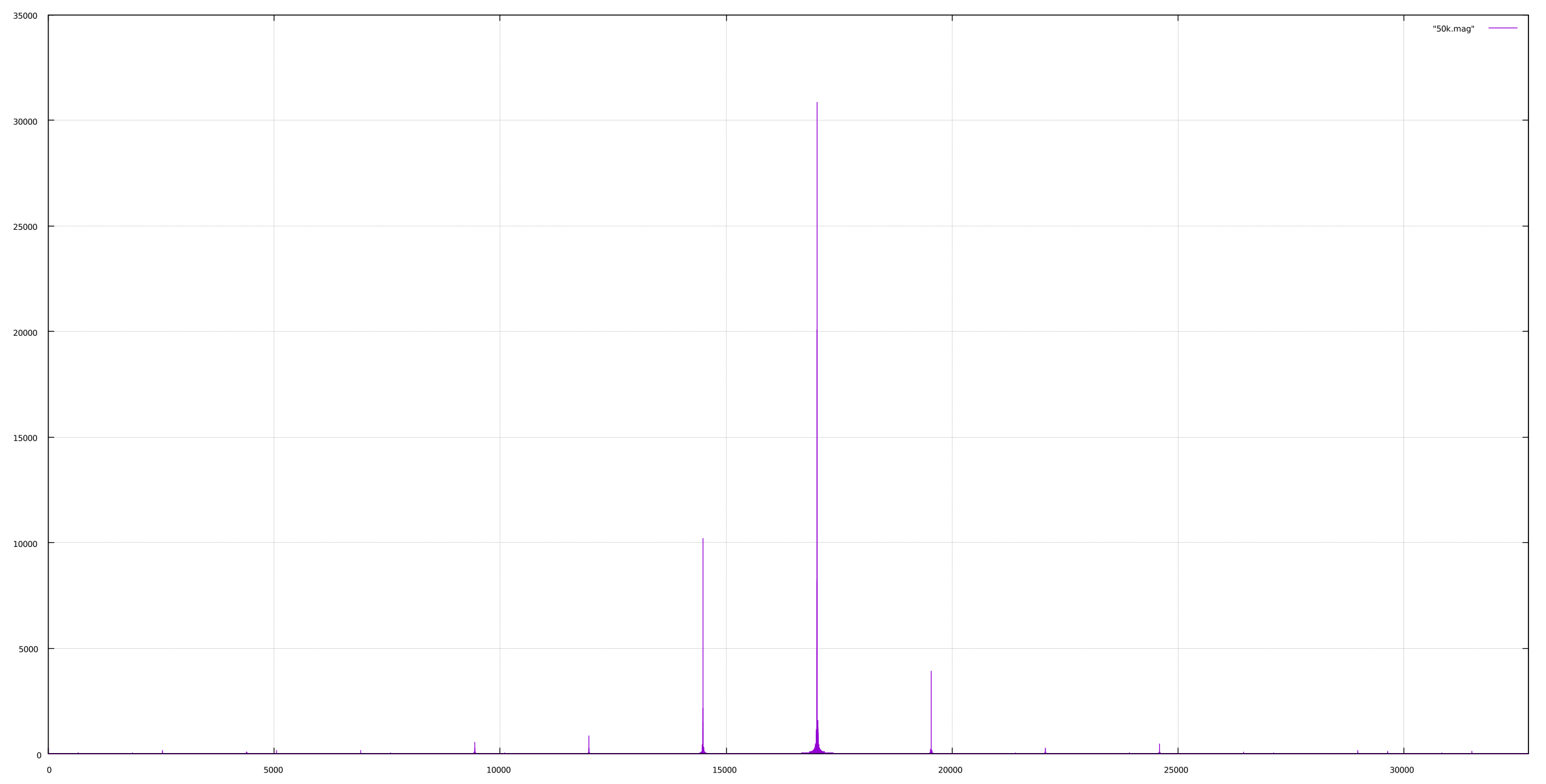
The plot below shows the spectrum of an oscillating piezo crystal. The
spectrum was calculated using an FFT. The data was acquired as
explained above. The major peak in the spectrum is at bin 17015 which
corresponds to a frequency of 51.9 kHz.
Pico Software
The following is the software that runs on the Pico. It can be compiled using the Raspberry Pi Pico C/C++ SDK. We have placed this software in the public domain. It can be used freely by anyone for any purpose whatsoever.
#include <stdio.h>
#include "pico/stdlib.h"
#include "hardware/gpio.h"
#include "hardware/adc.h"
#include "hardware/dma.h"

#define ADCBUFFSIZE 65536

int main()
{
  char c;
  uint16_t i;

  stdio_init_all();
  stdio_set_translate_crlf(&stdio_usb, false);

  // Set up the ADC
  adc_init();
  adc_gpio_init(27);
  adc_select_input(1);
  adc_fifo_setup(
      true,    // enable writing samples to FIFO
      true,    // enable DMA request when FIFO contains data
      1,       // number of samples in fifo required for DMA request
      false,   // disable sample error bit
      true     // reduce samples to 8 bits when pushing to FIFO
  );
  adc_set_clkdiv(239); // sets sampling rate to 200 ksps

  // Set up the DMA channel
  uint dma_chan = dma_claim_unused_channel(true);
  dma_channel_config cfg = dma_channel_get_default_config(dma_chan);
  channel_config_set_transfer_data_size(&cfg, DMA_SIZE_8);
  channel_config_set_read_increment(&cfg, false);
  channel_config_set_write_increment(&cfg, true);
  channel_config_set_dreq(&cfg, DREQ_ADC);
  dma_channel_configure(dma_chan, &cfg,
      adcbuff,        // destination
      &adc_hw->fifo,  // source
      ADCBUFFSIZE,    // number of bytes to transfer count
      false           // do not start immediately
  );

  // Start the adc and send data

  while(1){
    c = getchar(); // wait for acquisition command
    if(c == 'a'){
      dma_channel_start(dma_chan);
      adc_run(true);
      dma_channel_wait_for_finish_blocking(dma_chan);
      adc_run(false);
      adc_fifo_drain();
      dma_channel_abort(dma_chan);
      for(i=0; ififo, ADCBUFFSIZE, false);
    }
  }
}
Computer Software (Linux)
The following is the software that controls the Pico and acquires the data. It should compile and run on any Linux computer. It can be compiled using the GCC Compiler. With some modification it could possibly run on Windows or macOS. We have placed this software in the public domain. It can be used freely by anyone for any purpose whatsoever.
#include#include #include #include #include #include #include #define MAXBUFF 2048 // Compile: gcc -lm -o serial6 serial6.c int main(int argc, char *argv[]){ struct termios tty; char c; uint8_t buff[MAXBUFF]; int i, j, nbuff; if(argc < 3){ printf("Usage: %s port filename\n", argv[0]); printf(" port = serial port (/dev/ttyUSB0, /dev/ttyS1, etc)\n"); printf(" filename = output filename\n"); return(-1);} int port = open(argv[1], O_RDWR); if(port == -1){ perror("Error opening serial port"); return(1);} FILE *fp = fopen(argv[2], "w"); if(fp == NULL){ perror("Error opening output file"); return(1);} if(tcgetattr(port, &tty) != 0){ // read settings perror("Error reading tty settings"); return 1;} // Set the terminal to raw mode to allow for binary transfers cfmakeraw(&tty); tty.c_cc[VMIN] = 128; tty.c_cc[VTIME] = 0; // input and output baud rate cfsetispeed(&tty, B115200); cfsetospeed(&tty, B115200); if(tcsetattr(port, TCSANOW, &tty) != 0){ perror("Error setting up tty\n"); return 1;} tcflush(port, TCIOFLUSH); while(1){ printf("Enter \'a\' to begin acquisition any other key to quit\n"); c = getchar(); getchar(); // consume the \n if(c != 'a') break; write(port, "a\n", 2); for(i=0; i<65536/64; ++i){ nbuff = read(port, buff, 64); fwrite(buff, sizeof(uint8_t), nbuff, fp); // printf("%d %d\n", i, nbuff); } } fclose(fp); close(port); return 0; }
Copyright 2005-2025 by Exstrom Laboratories LLC